
 11
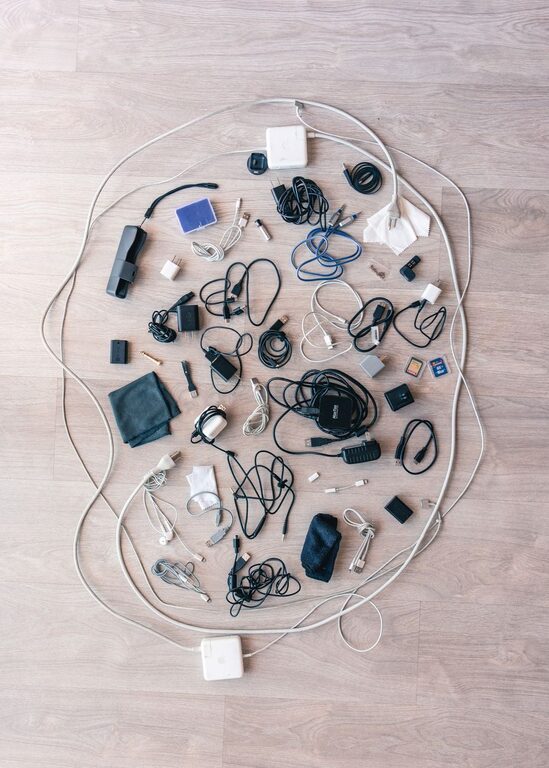
Cables and chargers have a way of collecting in drawers, on desks, and beside beds. When they are mixed together, finding the right one can take longer than expected. Tangled cords can also make a space look untidy and may become damaged over time.
The good news is that cable organization does not require expensive equipment or a complete room makeover. With a few simple supplies and a practical system, you can keep chargers easy to find, use, and store.
Before organizing anything, collect all the cables and chargers in one place. Check desks, drawers, bags, nightstands, kitchen counters, and other areas where electronics are used.
Place everything on a table or another open surface. This gives you a clear view of what you own and helps prevent duplicate purchases.
As you gather your cables, separate them into basic groups:
– Phone and tablet chargers
– Computer and monitor cables
– Audio and video cables
– Power cords
– Camera and gaming cables
– Cables you rarely use
– Unknown or unneeded cables
Do not worry about creating a perfect system right away. The first goal is simply to see what you have.
Many cable collections contain cords from old phones, broken devices, or electronics that are no longer used. Keeping everything can make organization more difficult.
Inspect each cable and ask yourself:
– Do I know what this cable is for?
– Do I still own the device it belongs to?
– Have I used it in the past year?
– Is it in good condition?
– Do I already have several similar cables?
Set aside damaged, frayed, or unreliable cables. If a cable has exposed wires, bent connectors, or signs of heat damage, do not continue using it. Recycle electronic accessories according to your local recycling guidelines when possible.
For cables that work but are rarely used, create a separate storage group instead of keeping them with your everyday chargers.
Once you have removed unwanted items, sort the remaining cables based on how and where you use them. A system based on everyday habits is usually easier to maintain than one based only on cable type.
Useful categories may include:
– Daily charging
– Work or study
– Travel
– Entertainment
– Occasional use
– Backup cables
You can also organize cables by location. For example, keep one set near your desk, another beside your bed, and a small travel set in a bag or case.
Avoid keeping every charger in one large container. Dividing cables by purpose makes it easier to find what you need without searching through a tangled pile.
Labels are especially helpful when several cables look alike. A small label can tell you what a cable connects to, where it belongs, or whether it is a backup.
You can use:
– Adhesive labels
– Colored tape
– Small cable tags
– Masking tape and a permanent marker
– Reusable label bands
Write short, clear descriptions such as “desk monitor,” “tablet,” “travel,” or “camera.” For chargers with removable cables, label both the charger and the cable so they can be matched easily.
Color coding can also make your system faster. For example, use one color for work equipment, another for travel, and another for personal devices. Choose colors you can recognize at a glance.
A few basic tools can prevent most cable clutter. Choose reusable options when possible so you can adjust the system as your needs change.
Reusable hook-and-loop ties are a good choice for bundling cords. They are easy to open and do not require cutting. Use one tie near the middle of a coiled cable and another if the cable is long.
Avoid tying cables too tightly. A loose, even coil helps protect the cord and makes it easier to unpack.
Adhesive clips can hold charging cables along the back or edge of a desk. They keep the connector within reach instead of allowing it to fall to the floor.
Before applying an adhesive clip, clean and dry the surface. Place clips where the cable naturally rests, rather than forcing it around a sharp corner.
A cable box can hide power strips and excess cord length while keeping them accessible. Look for one with ventilation openings and enough room for the power strip and plugs.
Do not overcrowd the box. Cables need space, and power equipment should not be covered in a way that traps heat.
Zippered pouches work well for travel cables, memory cards, adapters, and small accessories. Use one pouch for items you carry regularly and another for less frequently used accessories.
Clear pouches can make it easier to identify what is inside without opening every container.
The way you coil a cable affects its condition. Avoid wrapping cords tightly around a charger block or bending them sharply near the connector. Repeated stress in those areas can shorten the cable’s useful life.
A simple method is to:
For longer cables, use an over-under coiling technique. This creates alternating loops that reduce twisting and help the cable lie flat when uncoiled. It is particularly useful for audio, video, and extension cables.
A dedicated charging area can reduce clutter throughout your home. Choose a convenient location near an outlet, such as a desk, shelf, or side table.
A simple charging station may include:
– A power strip or charging hub
– Cable clips to hold connectors
– A tray for phones and small devices
– Labels for each charging cable
– A container for backup chargers
Keep only the chargers used regularly in this area. Store extra cables elsewhere so the station remains clear.
If several people use the same charging spot, label each section or use different colors. This can prevent cables from being mixed together.
A tidy desk should still be practical. Start by deciding which cables must remain connected. Remove cords for equipment you use only occasionally.
Then route the remaining cables along the back or underside of the desk. Use clips, ties, or a cable tray to keep them together. Leave enough slack for moving a monitor, laptop, or other device without pulling on the connector.
Keep frequently used cables within reach. Hide only the excess length, not the parts you need every day. A system that is difficult to access will probably not stay organized.
Occasional-use cables should not take up space in your daily charging area. Place them in a labeled box, drawer, or pouch.
Arrange them by category, such as:
– Computer accessories
– Audio and video
– Camera equipment
– Older device chargers
– Travel adapters
Keep a simple list of unusual cables if you often forget what they are for. You can also label both the cable and the storage container to make future sorting easier.
Cable organization works best when it becomes a small routine. Once a month, take a few minutes to return loose cables to their assigned places.
When you buy a new device, decide immediately where its charger will be stored. Remove an old or duplicate cable if it is no longer useful. Before traveling, prepare a small pouch with only the cables you need.
Avoid placing loose cables into a “temporary” drawer. Temporary storage often becomes a new clutter pile. Returning each cable to its labeled group takes only a few seconds and keeps the system manageable.
A neat cable setup should make everyday life easier, not add extra work. Start with the cables you use most, choose storage that fits your space, and keep the system simple enough to maintain. With clear labels, separate categories, and a few reusable organizers, tangled chargers can become an organized and useful part of your home or workspace.